> ## Documentation Index
> Fetch the complete documentation index at: https://docs.lantern.is/llms.txt
> Use this file to discover all available pages before exploring further.
# Custom Earn Events
> Learn how to create and trigger custom earn events using webhooks or Shopify Flow
Lantern allows you to create custom earn events to reward customers for behavior. These custom earn events can either be triggered by a Shopify Flow action or by a webhook.
## Creating Custom Earn Events
The first thing you will need to do is create a Custom Earn Event that we will trigger with the webhook.
1. Go to **Automations** → **Earn events**
2. Click **Create event**
3. Give your new event a name
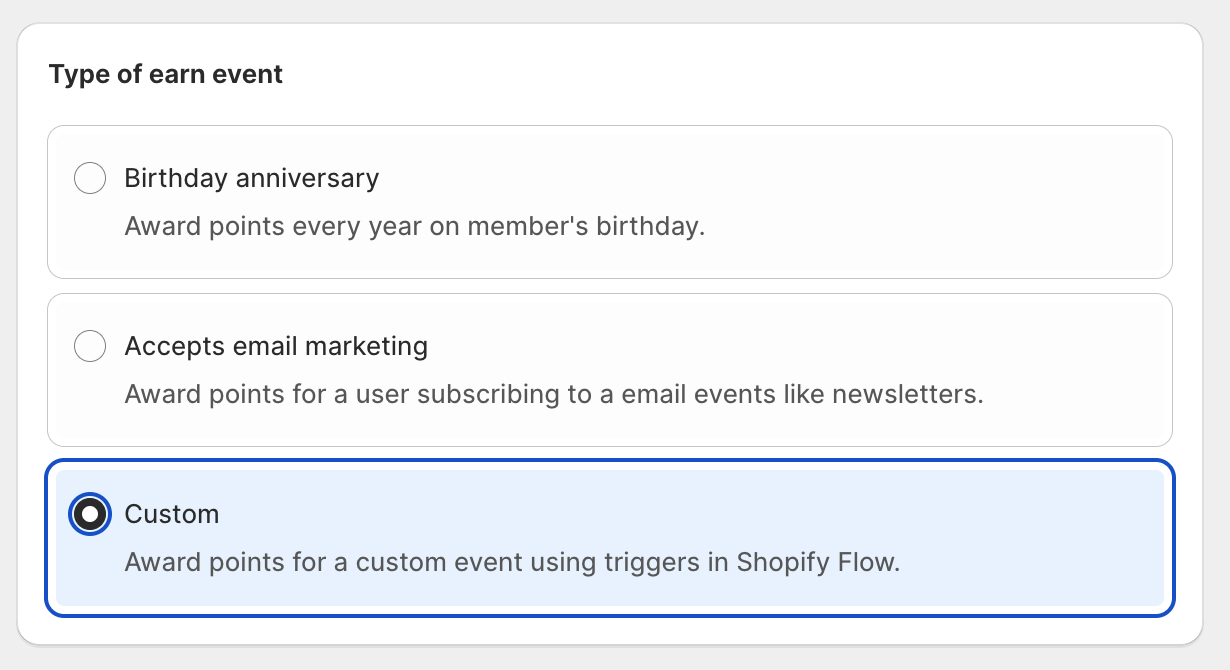
4. Choose **Custom** for the type
5. Choose how many points you want to award
6. Make sure to set the **Status** to **Active**
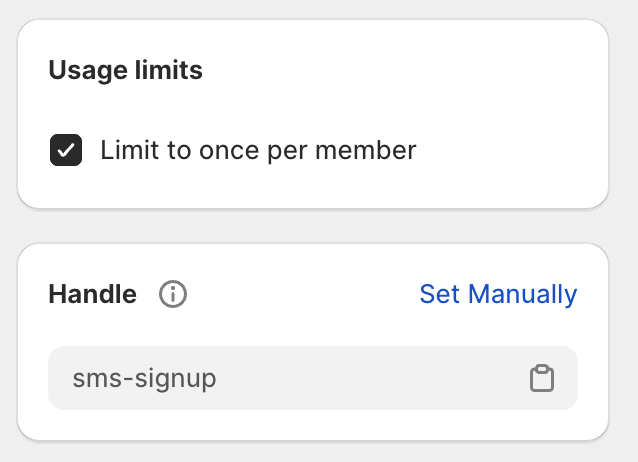
 Make sure to note the Handle shown in the card on the right of the screen. We will need this later. You can also set the option here to allow a member to only ever be allowed to receive the reward for this event once.
 ## Using Webhooks
To use a webhook to trigger an earn event, you'll need to have an API Key that you can use to authenticate the webhook request.
### Generating an API Key
1. Go to **Settings** → **Integrations** in Lantern
2. Click the "Generate API Key" button
3. You should see a new API Key appear
## Using Webhooks
To use a webhook to trigger an earn event, you'll need to have an API Key that you can use to authenticate the webhook request.
### Generating an API Key
1. Go to **Settings** → **Integrations** in Lantern
2. Click the "Generate API Key" button
3. You should see a new API Key appear
 ### Triggering the Event
Once you have your API Key and Earn Event set up, you are ready to trigger it with a webhook.
You will need to send a POST request to:
```
https://api.ltn.is/earn-events/action
```
Add an authorization header using the API Key you generated:
```
x-lantern-api-key: YOUR_LANTERN_API_KEY
```
Send either the Customer ID or email to identify the user you want to give the reward to, along with the handle from the Earn Event we created earlier. Send these as a JSON body in the request.
Example request body using email:
```json theme={null}
{
"email": "test@example.com",
"earn_event_handle": "YOUR_EARN_EVENT_HANDLE"
}
```
Example request body using customer ID:
```json theme={null}
{
"customer_id": "YOUR_CUSTOMER_ID",
"earn_event_handle": "YOUR_EARN_EVENT_HANDLE"
}
```
A full example using curl:
```bash theme={null}
curl -XPOST \
-H 'x-lantern-api-key: YOUR_LANTERN_API_KEY' \
-H "Content-type: application/json" \
-d '{"email":"test@example.com","earn_event_handle":"YOUR_EARN_EVENT_HANDLE"}' \
'https://api.ltn.is/earn-events/action'
```
If all goes well, you should receive a successful response with a 200 code. If you then view your customer in the Lantern admin, you should see they received the award for the earn event.
### Triggering the Event
Once you have your API Key and Earn Event set up, you are ready to trigger it with a webhook.
You will need to send a POST request to:
```
https://api.ltn.is/earn-events/action
```
Add an authorization header using the API Key you generated:
```
x-lantern-api-key: YOUR_LANTERN_API_KEY
```
Send either the Customer ID or email to identify the user you want to give the reward to, along with the handle from the Earn Event we created earlier. Send these as a JSON body in the request.
Example request body using email:
```json theme={null}
{
"email": "test@example.com",
"earn_event_handle": "YOUR_EARN_EVENT_HANDLE"
}
```
Example request body using customer ID:
```json theme={null}
{
"customer_id": "YOUR_CUSTOMER_ID",
"earn_event_handle": "YOUR_EARN_EVENT_HANDLE"
}
```
A full example using curl:
```bash theme={null}
curl -XPOST \
-H 'x-lantern-api-key: YOUR_LANTERN_API_KEY' \
-H "Content-type: application/json" \
-d '{"email":"test@example.com","earn_event_handle":"YOUR_EARN_EVENT_HANDLE"}' \
'https://api.ltn.is/earn-events/action'
```
If all goes well, you should receive a successful response with a 200 code. If you then view your customer in the Lantern admin, you should see they received the award for the earn event.